.png?fit=max&auto=format&n=BTEMalYyM0xskXeS&q=85&s=3495b9a1f1230446e6de7883f20fc8cd)
Unified Color Engine
The Mkt-Viper suite is comprised of three distinct tools that are designed to work in harmony:- Mkt-Viper Pro
- Mkt-Viper Edge
- Viper Oscillator
Mkt-Viper Color CustomizationThe Mkt-Viper ecosystem (Pro, Edge, and Oscillator) was designed from the ground up to utilize high-contrast neon accents, deep gradients, and transparency layers.For the best visual experience, we strongly recommend using a Dark Background on TradingView. While the indicators function on light charts, the signature glow effects and gradient channels “pop” significantly better against a dark canvas, reducing eye strain and making critical signals easier to identify during long trading sessions.
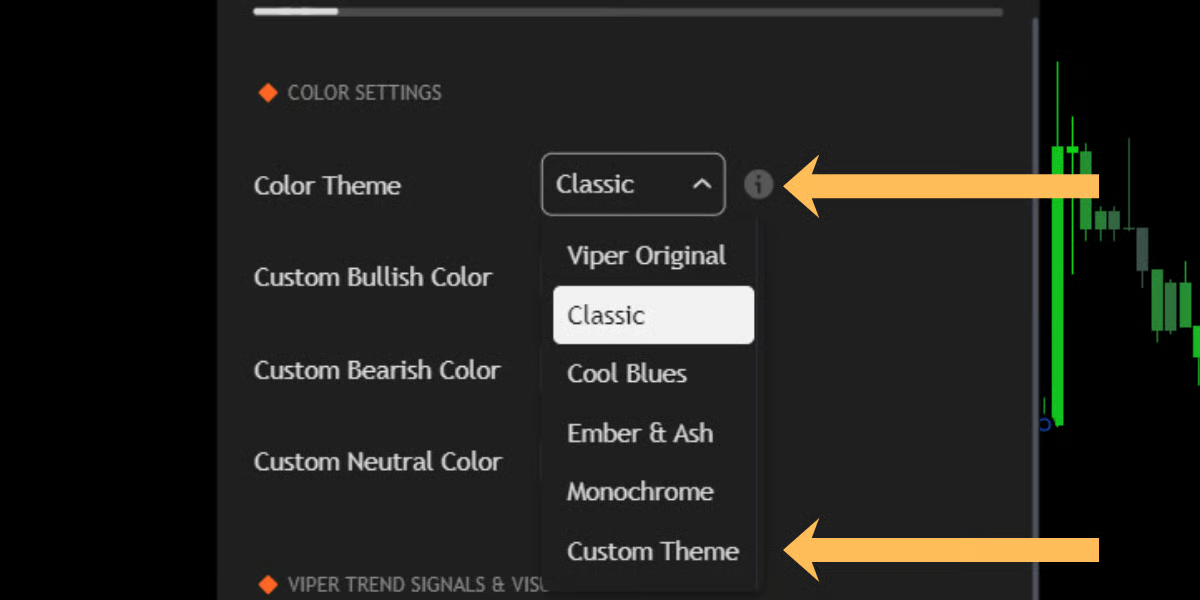
1. Preset Color Themes
We have curated a selection of professional palettes designed to fit different trading moods and styles. You can select these from the “Color Theme” dropdown in the settings menu:- Viper Original: The signature look. Features electric Green buy signals and deep Purple sell signals. High contrast and distinct.
- Classic: Traditional Green vs. Red. Ideal for traders who prefer standard market conventions.
- Cool Blues: A calming palette of Cyans, Blues, and Indigo. Great for reducing emotional reaction to red candles.
- Ember & Ash: A high-contrast mix of warm Oranges and deep Slate Blues.
- Monochrome: A grayscale minimal theme (White/Grey/Black). Perfect for traders who want zero color distraction or for printing charts.
2. Custom Theme Engine
Do you have a specific branding color or a favorite chart aesthetic? The Custom Theme engine allows you to take full control.- Select “Custom Theme” from the Color Theme dropdown.
- Use the color pickers immediately below to define your specific palette:
- Custom Bullish Color: Defines Buy signals, Up-trends, and Support zones.
- Custom Bearish Color: Defines Sell signals, Down-trends, and Resistance zones.
- Custom Neutral Color: Defines ranging markets and baseline levels.