.png?fit=max&auto=format&n=BTEMalYyM0xskXeS&q=85&s=3495b9a1f1230446e6de7883f20fc8cd)
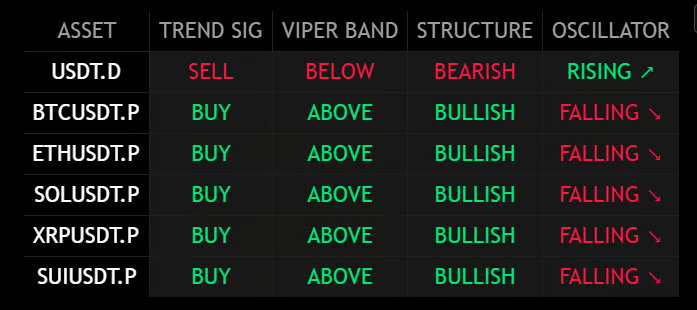
- BUY (Green): Price is currently signaling an uptrend on the Mkt-Viper Pro.
- SELL (Red): Price is currently signaling a downtrend on the Mkt-Viper Pro.
- ABOVE: Strong Bullish Trend.
- BELOW: Strong Bearish Trend.
- INSIDE: Ranging / Equilibrium (Neutral).
- BULLISH: Making Higher Highs/Lows.
- BEARISH: Making Lower Highs/Lows.
- RISING ↗: Momentum is expanding upward.
- FALLING ↘: Momentum is contracting or expanding downward.
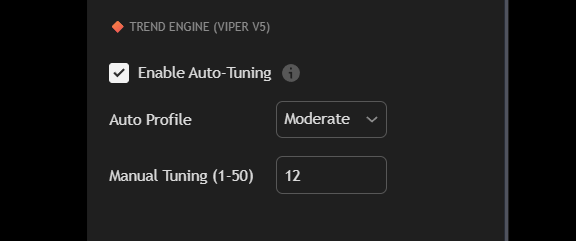
- Auto-Tuning: The dashboard automatically measures the “Path Efficiency” of the market to adjust sensitivity. You can toggle between Fast, Moderate, and Slow profiles to match your trading style (Scalping vs. Swing).
- Global Timeframe: Control the timeframe of the entire scan from a single dropdown menu. Scan the 4H trends while looking at a 15m chart.
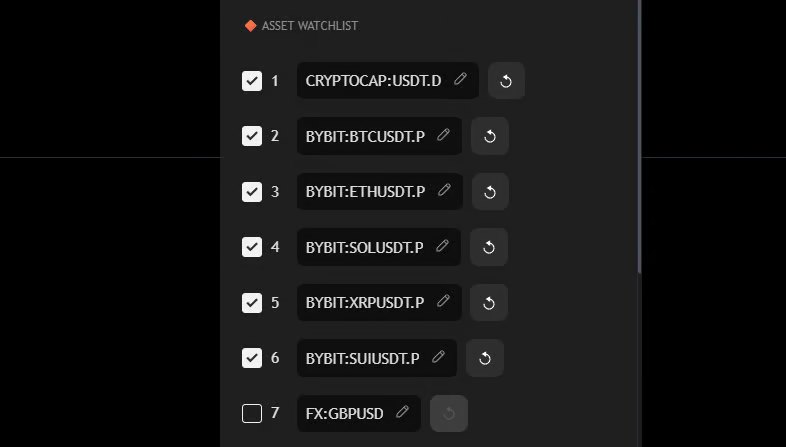
- The script allows you to input any ticker available on TradingView (Crypto, Forex, Indices, Stocks).
- Toggle specific slots On/Off to keep your dashboard clean.